
Install Facet for Rhino
Facet runs as a plug-in inside Rhino 8. Install it, then start a free trial or activate your license.
Facet requires Rhino 8 on Windows. Don't have it?
1
Open the Package Manager
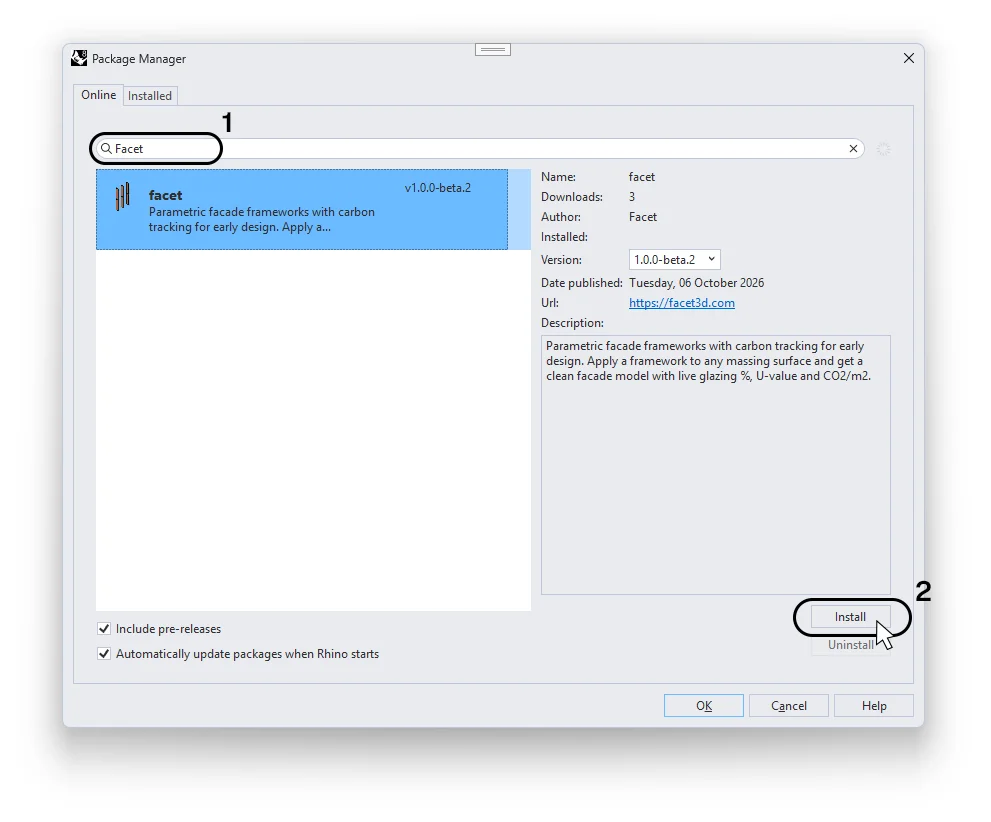
Click the button below. Your browser will ask to open Rhino. Allow it, and the Package Manager opens with Facet already in the search.
Button not working? In Rhino, type PackageManager, and search for "facet".
2
Install
Select Facet and click Install.
3
Restart Rhino and open Facet
Restart Rhino to finish.
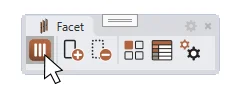
Launch Facet via the toolbar. Click "Select Framework" to open the Gallery. You'll be asked to start your trial or enter your license key on the first run.
4
Activate
Choose the one that fits you.
Start a free trial
Enter your email and Facet sends you a 6-digit code.
Paste it, and your trial starts.
Enter your license key
Instead of starting a trial, choose Enter a license key and paste the key from your license email.
Switch trial to a license
Open Facet Settings

→ License → Enter Different Key and paste your license key.